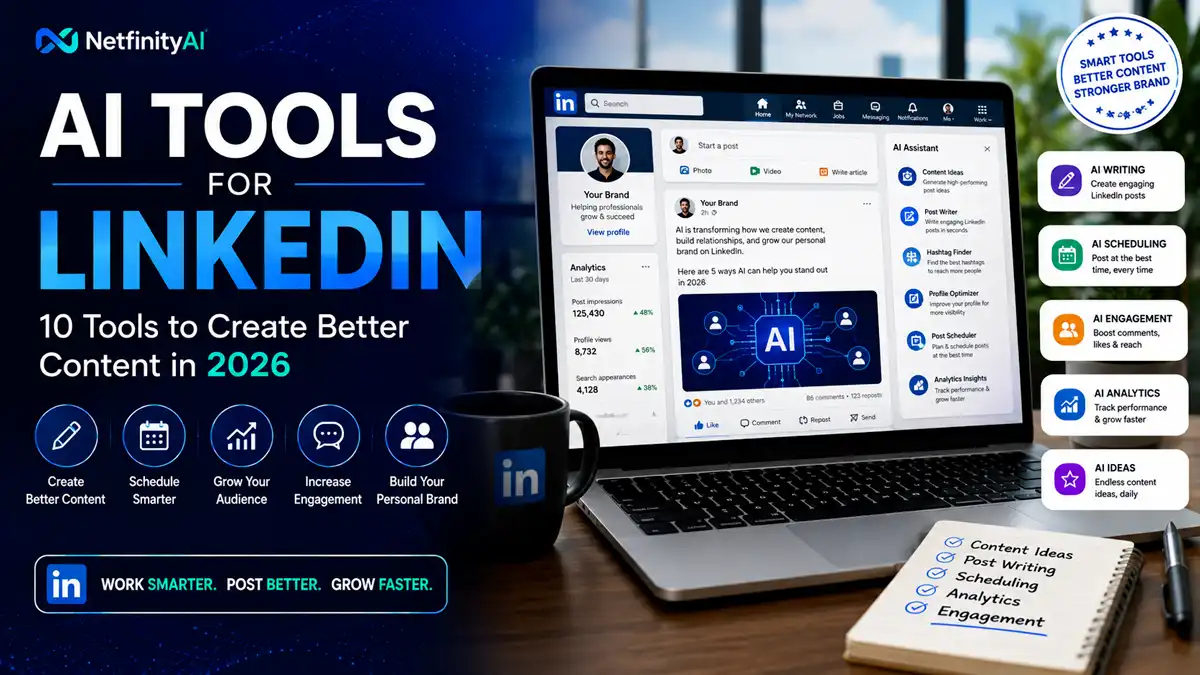
AI Tools for LinkedIn: 10 Tools to Create Better Content in 2026
Creating consistently good LinkedIn content sounds simple until you actually have to do it every week. Finding ideas, writing strong hooks, editing posts, creating visuals, repurposing existing content, and keeping a publishing schedule can quickly become a full-time task.
AI tools can make that process faster.
Instead of starting every LinkedIn post from a blank page, professionals can use AI to brainstorm ideas, turn rough notes into drafts, improve hooks, repurpose long-form content, polish writing, and organize publishing workflows.
But using AI for LinkedIn isn’t just about generating more posts. Generic AI-generated content can easily sound repetitive, overly polished, or disconnected from the person publishing it.
The best approach is to use AI for the repetitive parts of content creation while keeping your own experience, opinions, expertise, and personality at the center.
In this guide, we’ll compare 10 AI tools for LinkedIn in 2026, explain what each tool does best, and help you choose the right option for content creation, personal branding, scheduling, visual content, and sales outreach.
At a Glance
| Your LinkedIn Goal | Tool Type to Consider | Best For |
|---|---|---|
| Generate post ideas | General AI assistant | Brainstorming |
| Write LinkedIn posts | AI writing tool | Faster drafting |
| Create stronger hooks | AI writing assistant | Improving engagement |
| Build a personal brand | LinkedIn-focused AI | Consistent publishing |
| Schedule posts | Social media scheduler | Content consistency |
| Repurpose content | AI content platform | Turning one idea into multiple posts |
| Create visual posts | AI social-content tool | Images and branded content |
| Improve writing | AI editor | Clarity and tone |
| Sales outreach | AI sales assistant | Personalized messaging |
| Manage multiple channels | Social publishing platform | Cross-platform distribution |
Quick takeaway: You don’t need multiple AI subscriptions to improve your LinkedIn workflow. Start with the tool that solves your biggest content problem, then add specialized software only when it provides a clear benefit.
Quick Comparison Table
| AI Tool | Best For | Main Strength | Ideal User |
|---|---|---|---|
| ChatGPT | Content creation | Flexible writing and brainstorming | Professionals & creators |
| Claude | Long-form writing | Natural, detailed responses | Thought leaders |
| Jasper | Marketing content | Brand-focused content creation | Marketers |
| Taplio | LinkedIn content | LinkedIn-specific workflows | LinkedIn creators |
| AuthoredUp | LinkedIn publishing | Content creation and scheduling | Professionals |
| Hypefury | Content repurposing | Scheduling and distribution | Creators |
| Buffer | Social scheduling | Simple publishing workflow | Individuals & teams |
| Predis.ai | Social content | AI-generated social posts | Marketers |
| Grammarly | Writing improvement | Editing and tone | Professionals |
| Lavender | Sales messaging | Personalized outreach | Sales teams |
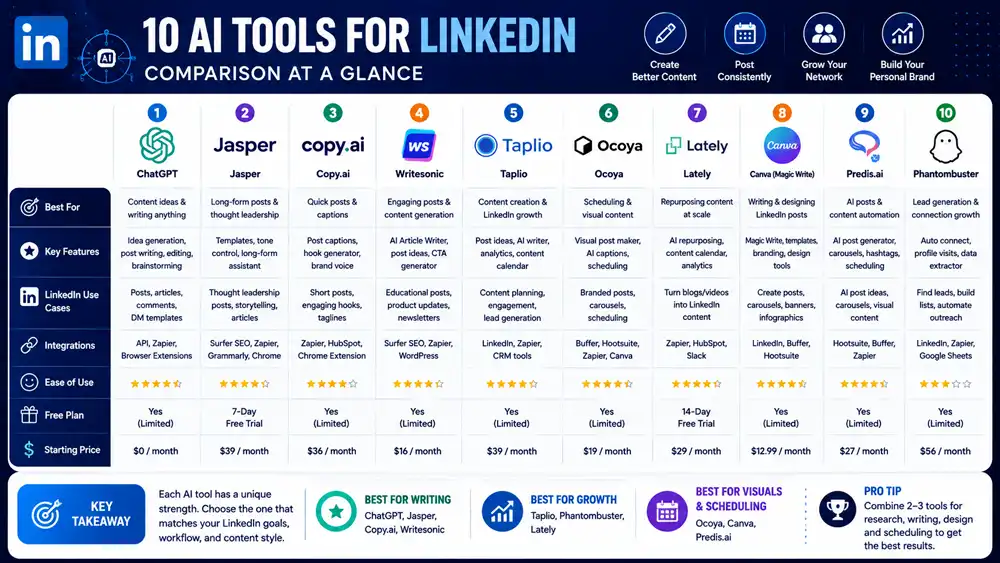
Note: Features, plans, and AI capabilities can change over time. Check each tool’s official website before making a purchasing decision.
What Can AI Tools Do for LinkedIn?
AI tools can support several parts of a LinkedIn content workflow, but their usefulness depends on how you use them.
Generate Post Ideas
AI can turn a topic, experience, product update, or industry trend into multiple potential LinkedIn post ideas. This can help overcome the common problem of not knowing what to publish.
Improve Hooks
The first few lines of a LinkedIn post can determine whether someone continues reading. AI writing tools can generate different hooks and help you test alternative ways of introducing the same idea.
Write and Edit Posts
AI can help transform rough notes into a structured LinkedIn post, improve clarity, shorten long sentences, and suggest different tones.
However, adding your own experiences, opinions, examples, and expertise is important if you want the content to feel authentic.
Repurpose Existing Content
A blog post, newsletter, YouTube video, podcast transcript, or presentation can potentially become several LinkedIn posts.
This makes AI particularly useful for content repurposing.
Maintain a Publishing Workflow
Some platforms combine AI content creation with scheduling and publishing features. This can help professionals maintain consistency without manually preparing every post immediately before publication.
1. ChatGPT — Best Overall AI Tool for LinkedIn
ChatGPT is one of the most flexible options for creating and improving LinkedIn content.
You can provide a topic, rough notes, customer question, article, or personal experience and ask the AI to turn it into LinkedIn post ideas, hooks, outlines, or complete drafts.
Its biggest advantage is flexibility. You aren’t limited to one content format, so the same assistant can help with brainstorming, rewriting, summarizing, research, and content repurposing.
Key Features
- LinkedIn post brainstorming
- Hook generation
- Content rewriting
- Long-form content repurposing
- Summarization
- Tone adjustment
- Content planning
- Idea generation
Best For
Professionals and creators who want a flexible AI assistant for their LinkedIn workflow.
Pros
- Highly versatile
- Useful for many content formats
- Good for brainstorming and rewriting
- Can work from your own notes and source material
Cons
- Not specifically built around LinkedIn publishing
- Scheduling requires another platform or workflow
2. Claude — Best for Long-Form LinkedIn Content
Claude can be useful when your LinkedIn strategy relies on detailed thought leadership, long-form posts, research summaries, or content repurposing.
It can take substantial source material and help turn it into more concise content while maintaining the original context and ideas.
For professionals who want LinkedIn posts to sound thoughtful rather than overly promotional, Claude can be a useful writing partner.
Key Features
- Long-form writing
- Content summarization
- Rewriting
- Brainstorming
- Research analysis
- Content repurposing
Best For
Thought leaders and professionals creating detailed, insight-driven LinkedIn content.
Pros
- Strong long-form writing
- Useful for summarizing complex material
- Good for developing ideas
- Flexible content workflows
Cons
- Not a dedicated LinkedIn publishing platform
- Scheduling requires another tool
3. Jasper — Best for Marketing Teams
Jasper is an AI content platform designed with marketing workflows in mind.
For LinkedIn marketers, it can help create social content while maintaining consistent messaging and brand style. This can be particularly useful when several people contribute to a company’s content operation.
Instead of simply generating a generic LinkedIn post, marketers can use structured workflows and brand guidelines to create content that fits a broader marketing strategy.
Key Features
- AI content generation
- Marketing workflows
- Brand voice support
- Content repurposing
- Campaign assistance
- Social media content
Best For
Marketing teams that need consistent LinkedIn content aligned with a brand voice.
Pros
- Marketing-focused
- Useful for teams
- Brand consistency features
- Supports broader content workflows
Cons
- More specialized than a general AI assistant
- May be excessive for individuals who only need occasional LinkedIn posts
4. Taplio — Best LinkedIn-Specific Tool
Taplio is built specifically around LinkedIn content and personal branding.
Its focus makes it different from general-purpose AI assistants. Instead of adapting a broad AI platform to LinkedIn, users get features designed around creating, managing, and growing LinkedIn content.
For creators and professionals who treat LinkedIn as an important channel for personal branding, this specialized approach can be valuable.
Key Features
- LinkedIn post creation
- AI writing assistance
- Content ideas
- Post scheduling
- Personal branding workflows
- LinkedIn-focused analytics
Best For
LinkedIn creators and professionals who publish frequently.
Pros
- Built specifically for LinkedIn
- Focused content workflow
- Useful for consistent publishing
- Personal-branding oriented
Cons
- Less useful if LinkedIn isn’t your primary platform
- Specialized features may not justify another subscription for occasional users
5. AuthoredUp — Best for LinkedIn Publishing
AuthoredUp focuses on helping LinkedIn users create, format, manage, and schedule content.
Its LinkedIn-specific workflow can be useful for professionals who want more control over how their posts look and how consistently they publish.
For users who already know what they want to say but need a better publishing workflow, a dedicated LinkedIn content platform can save time.
Key Features
- LinkedIn content creation
- Post formatting
- Scheduling
- Content management
- Analytics
- Publishing workflow
Best For
Professionals who want a dedicated LinkedIn content and publishing workflow.
Pros
- LinkedIn-focused
- Useful publishing features
- Helps organize content
- Designed for consistent posting
Cons
- Primarily useful for active LinkedIn users
- Doesn’t replace a full marketing or CRM platform
6. Hypefury — Best for Content Distribution
Hypefury is a social media publishing platform that can help creators turn ideas into social posts, schedule content, and maintain a consistent publishing workflow.
For LinkedIn users, its value is less about replacing your personal expertise and more about helping you distribute content consistently across social platforms.
Key Features
- AI-assisted content creation
- Social post scheduling
- Content repurposing
- Publishing automation
- Content management
- Multi-platform workflows
Best For
Creators who want to repurpose LinkedIn content across multiple social platforms.
Pros
- Useful for content distribution
- Helps maintain publishing consistency
- Supports repurposing
- Suitable for creators
Cons
- More useful for multi-platform creators
- Not a dedicated LinkedIn analytics platform
7. Buffer — Best for Simple Scheduling
Buffer is a social media management platform focused on creating, scheduling, and publishing content across social networks.
For LinkedIn users, Buffer can simplify the publishing process. Instead of manually posting at different times, you can prepare content in advance and organize it within a publishing calendar.
Key Features
- LinkedIn scheduling
- Content calendar
- AI-assisted content creation
- Social publishing
- Analytics
- Team collaboration
Best For
Individuals and small teams looking for a simple LinkedIn scheduling workflow.
Pros
- Easy to use
- Straightforward scheduling
- Supports multiple platforms
- Useful content calendar
Cons
- Less LinkedIn-specific than Taplio
- Advanced workflows may require paid features
8. Predis.ai — Best for Visual Social Content
Predis.ai focuses on AI-assisted social media content creation, including text, visuals, and branded social posts.
This can be useful for businesses that want LinkedIn content to include more than plain text. Product announcements, promotional posts, educational content, and branded social graphics can be developed through a more visual workflow.
Key Features
- AI social posts
- Visual content generation
- Captions
- Content ideas
- Social media scheduling
- Brand-focused content
Best For
Businesses and marketers creating visual LinkedIn content.
Pros
- Combines text and visual content
- Useful for social media teams
- Content creation and scheduling
- Supports multiple platforms
Cons
- More broad social-media focused
- May provide more features than a LinkedIn-only user needs
9. Grammarly — Best for Editing LinkedIn Posts
Grammarly is primarily a writing and editing assistant rather than a LinkedIn publishing platform.
Its biggest value for LinkedIn users is improving the quality of their writing. It can help identify grammar issues, improve clarity, adjust tone, and make posts easier to read.
For professionals who already write their own content but want a reliable editing layer, Grammarly can complement a broader AI writing workflow.
Key Features
- Grammar checking
- Clarity improvements
- Tone suggestions
- Rewriting
- Writing assistance
- Professional communication support
Best For
Professionals who write their own LinkedIn content and want to improve clarity and tone.
Pros
- Easy to integrate into writing workflows
- Strong editing capabilities
- Useful for professional communication
- Helps improve readability
Cons
- Not a dedicated LinkedIn tool
- Doesn’t replace a social publishing platform
10. Lavender — Best for LinkedIn Sales Outreach
Lavender takes a different approach from the other tools on this list. Rather than focusing primarily on LinkedIn post creation, it is designed to improve sales messaging.
For sales professionals using LinkedIn as part of their prospecting strategy, better outreach messages can be just as important as public content.
Lavender can help sales teams improve email and outreach messaging, making it a complementary tool for LinkedIn-based prospecting workflows.
Key Features
- AI-assisted sales writing
- Message analysis
- Personalization assistance
- Sales coaching
- Outreach optimization
Best For
Sales professionals using LinkedIn for prospecting and personalized outreach.
Pros
- Sales-focused
- Useful for message improvement
- Supports personalized communication
- Helps sales teams improve outreach
Cons
- Not primarily a LinkedIn content tool
- More relevant to sales teams than content creators
Best AI Tools for Different LinkedIn Tasks
Choosing an AI tool becomes easier when you start with the task rather than the software.
| LinkedIn Task | Recommended Tool |
|---|---|
| General content creation | ChatGPT |
| Long-form thought leadership | Claude |
| Marketing content | Jasper |
| LinkedIn-specific content | Taplio |
| LinkedIn publishing | AuthoredUp |
| Content scheduling | Buffer |
| Visual social content | Predis.ai |
| Editing and clarity | Grammarly |
| Sales outreach | Lavender |
| Multi-platform distribution | Hypefury |
Best for Writing LinkedIn Posts
ChatGPT is our overall choice for flexible LinkedIn writing because it can generate ideas, rewrite drafts, create hooks, and repurpose existing material.
Best for Personal Branding
Taplio is a strong option for professionals who make LinkedIn a major part of their personal-branding strategy.
Best for Scheduling
Buffer is a practical choice if your primary requirement is planning and scheduling LinkedIn content without adopting a highly specialized platform.
Best for LinkedIn Sales
Lavender is better suited to sales professionals who use LinkedIn as part of a broader prospecting and outreach process.
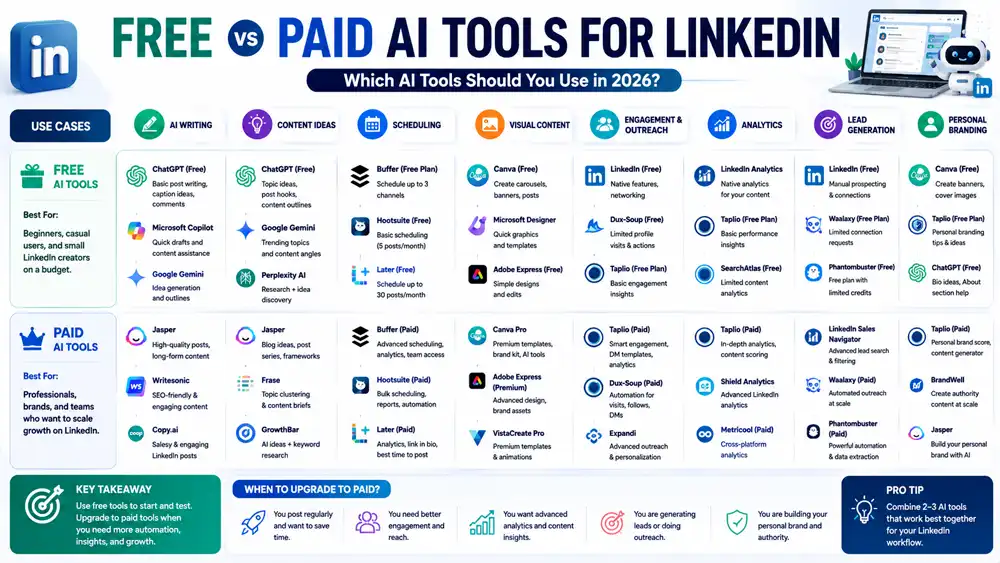
Free vs Paid AI Tools for LinkedIn
You don’t necessarily need a paid AI subscription to improve your LinkedIn workflow.
Free AI tools can be enough for brainstorming, rewriting, creating basic post ideas, and improving short-form content. They are particularly useful if you’re just starting to build a LinkedIn presence.
Paid tools become more useful when you need higher usage limits, advanced content workflows, scheduling, analytics, brand controls, collaboration, or specialized LinkedIn features.
Which Should You Choose?
Choose free tools if:
- You’re posting occasionally.
- You mainly need writing assistance.
- You’re testing whether AI fits your workflow.
- You manage your LinkedIn account yourself.
Consider paid tools if:
- LinkedIn is an important marketing channel.
- You publish multiple times per week.
- You manage a company or personal brand.
- You need scheduling and analytics.
- You’re part of a marketing or sales team.
The goal shouldn’t be to collect as many AI subscriptions as possible. Start with the smallest toolset that solves your actual problem.
How to Choose the Right AI Tool for LinkedIn
Before choosing an AI tool, identify what you want to improve.
1. Decide What You Need
Do you need help writing posts, generating ideas, scheduling content, improving your writing, creating visuals, or generating sales messages?
The answer will immediately narrow your options.
2. Consider Your Content Style
If your LinkedIn strategy depends heavily on personal stories and professional experiences, a general AI assistant may be more useful than a fully automated content generator.
AI should help you communicate your ideas—not replace them.
3. Check Scheduling and Publishing Features
If consistency is your biggest problem, prioritize tools that include content calendars and scheduling rather than paying for another writing assistant.
4. Consider Your Existing Tools
If you’re already using a social media management platform, check whether it supports LinkedIn before adding another subscription.
Reducing duplicate tools can make your workflow simpler and cheaper.
5. Review Privacy and Data Policies
Avoid blindly uploading confidential business information, customer data, private conversations, or sensitive company documents into an AI platform.
Always review the provider’s privacy and data-handling policies before using AI with sensitive information.
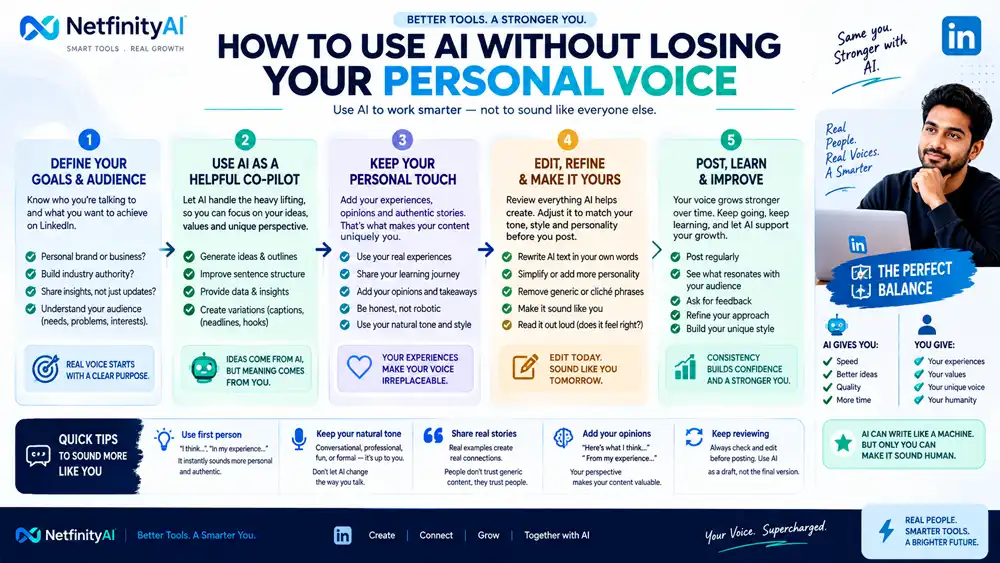
How to Use AI Without Losing Your Personal Voice
One of the biggest problems with AI-generated LinkedIn content is that it can sound generic.
A better approach is to treat AI as an assistant rather than an autopilot.
Start with your own experience, opinion, observation, customer question, or professional lesson. Then use AI to organize the idea, improve the structure, suggest hooks, or create alternative versions.
Before publishing, add your own examples and rewrite anything that doesn’t sound like you.
A useful workflow is:
Your idea → AI draft → Your experience → Human editing → Final LinkedIn post
This approach can make content creation faster while keeping the final post authentic.
Our Top 3 AI Tools for LinkedIn
🥇 ChatGPT — Best Overall
Choose ChatGPT if you want a flexible AI assistant that can help with brainstorming, writing, editing, research, and content repurposing.
🥈 Taplio — Best LinkedIn-Specific Option
Choose Taplio if LinkedIn is one of your primary channels and you want a more specialized content and personal-branding workflow.
🥉 Buffer — Best for Simple Scheduling
Choose Buffer if your biggest challenge is consistently publishing content across LinkedIn and other social platforms.
Our recommendation: Start with one general-purpose AI assistant. Add a dedicated LinkedIn tool only when your publishing volume or workflow requires it.
Frequently Asked Questions
What are the best AI tools for LinkedIn?
ChatGPT, Taplio, AuthoredUp, Buffer, Claude, and Jasper are among the useful options depending on whether you need writing, LinkedIn-specific workflows, scheduling, or marketing content.
Can AI create LinkedIn posts?
Yes. AI can generate LinkedIn post ideas, hooks, outlines, drafts, and variations. However, adding your own experience and perspective usually produces more authentic content.
Is it safe to use AI for LinkedIn content?
Generally, AI can be useful for content creation, but you should avoid sharing confidential business information, private customer data, or sensitive company material unless you understand the platform’s data policies and have permission to use it.
What is the best free AI tool for LinkedIn?
A general-purpose AI assistant such as ChatGPT can be a practical starting point for brainstorming and writing LinkedIn content. Your best option depends on the features available in the plan you’re using.
Can AI help grow a LinkedIn personal brand?
Yes. AI can help maintain a consistent publishing schedule, generate content ideas, repurpose existing material, and improve writing. However, your expertise, experiences, and genuine engagement remain important.
Should I automate my entire LinkedIn account?
It’s better to automate repetitive parts of the workflow rather than everything. AI can help with ideation, drafting, repurposing, and scheduling while you retain control over the final content and conversations.
Final Verdict
AI tools can make LinkedIn content creation significantly faster, but the best results come from combining AI efficiency with human expertise.
For most professionals, ChatGPT is the best starting point because it can handle many different content tasks. Taplio is a strong choice for LinkedIn-focused creators and personal brands, while Buffer is useful for straightforward scheduling.
You don’t need ten AI subscriptions to succeed on LinkedIn. Start with one tool that solves your biggest problem, develop a consistent workflow, and add specialized software only when it provides a measurable benefit.