Microsoft Copilot vs ChatGPT: Which AI Assistant Is Better? (2026)
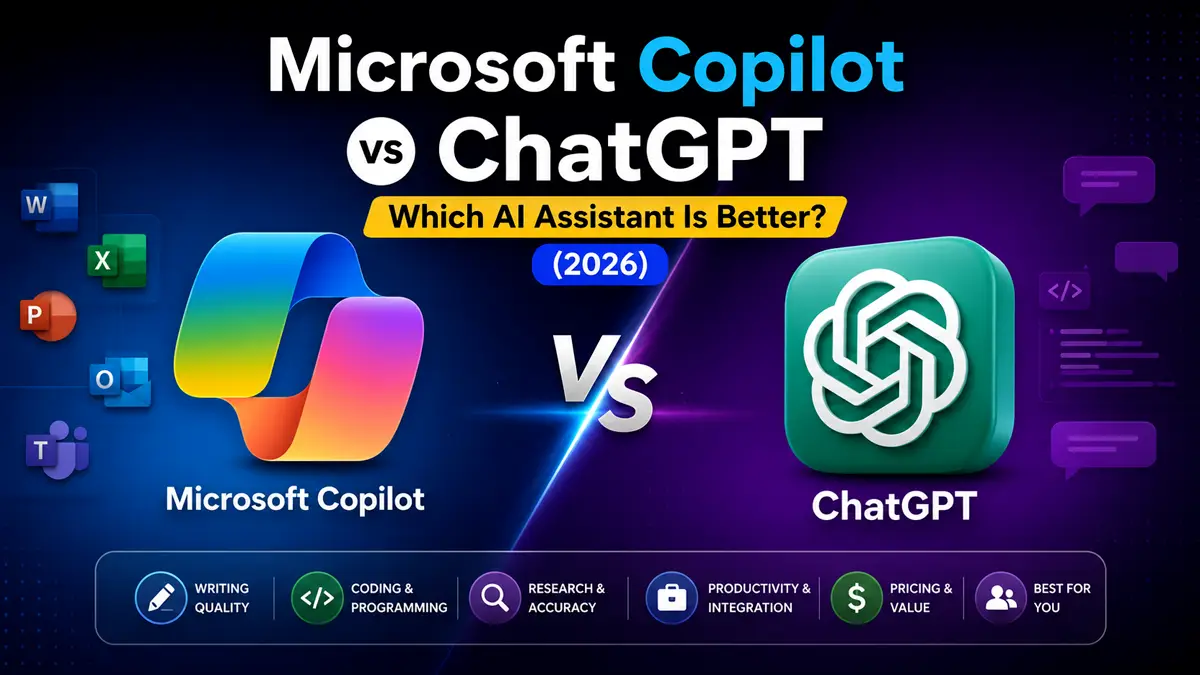
Artificial intelligence is transforming the way people work, study, and create content. Among the leading AI assistants in 2026, Microsoft Copilot and ChatGPT are two of the most popular choices, offering powerful features that help users write, code, research, brainstorm, and improve productivity.
Although both AI assistants are built on advanced language models, they serve different purposes. ChatGPT is known for its versatility, creativity, and conversational experience, while Microsoft Copilot is deeply integrated into Microsoft’s ecosystem, helping users work more efficiently with Windows, Microsoft 365, Word, Excel, PowerPoint, Outlook, and Teams.
So, which AI assistant is the better choice in 2026?
In this detailed comparison, we’ll evaluate Microsoft Copilot and ChatGPT based on writing quality, coding, research, productivity, Microsoft 365 integration, pricing, ease of use, and overall value. By the end of this guide, you’ll know which AI assistant best fits your personal or professional workflow.
If you’re comparing today’s leading AI assistants, you may also enjoy our ChatGPT vs Claude, ChatGPT vs Gemini, Claude vs Gemini, Perplexity AI vs ChatGPT, and Kimi vs ChatGPT comparisons.
Microsoft Copilot vs ChatGPT: Quick Comparison
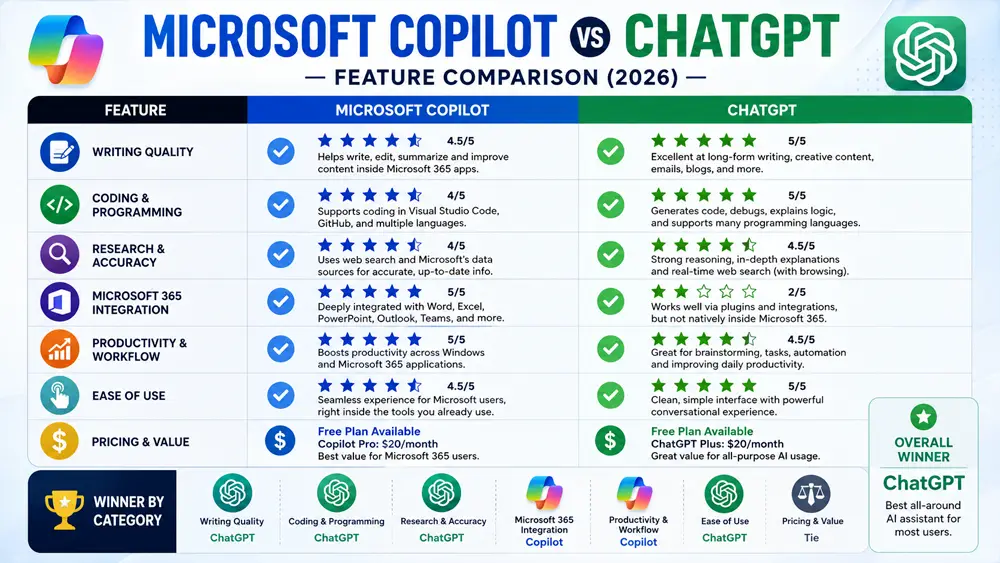
If you’re looking for a quick answer, both Microsoft Copilot and ChatGPT are excellent AI assistants, but they excel in different areas. ChatGPT provides an outstanding all-around experience for writing, coding, creativity, and problem-solving, while Microsoft Copilot stands out through its seamless integration with Microsoft 365, Windows, and business productivity tools. The best choice depends on how and where you use AI every day.
Comparison Table
| Feature | ChatGPT | Microsoft Copilot |
|---|---|---|
| Developer | OpenAI | Microsoft |
| Best For | All-purpose AI | Microsoft 365 Productivity |
| Free Plan | Yes | Yes |
| Premium Plan | ChatGPT Plus | Copilot Pro |
| Writing | ⭐⭐⭐⭐⭐ | ⭐⭐⭐⭐☆ |
| Coding | ⭐⭐⭐⭐⭐ | ⭐⭐⭐⭐☆ |
| Research | ⭐⭐⭐⭐☆ | ⭐⭐⭐⭐☆ |
| Microsoft 365 Integration | ⭐⭐☆☆☆ | ⭐⭐⭐⭐⭐ |
| Productivity | ⭐⭐⭐⭐⭐ | ⭐⭐⭐⭐⭐ |
| Overall Rating | ⭐⭐⭐⭐⭐ | ⭐⭐⭐⭐☆ |
Looking for another AI comparison? Read our ChatGPT vs Gemini guide to see how ChatGPT compares with Google’s AI assistant.
Table of Contents
What Is ChatGPT?
ChatGPT is an advanced AI assistant developed by OpenAI. It helps users write content, generate ideas, answer questions, summarize documents, create code, analyze information, and improve productivity across personal, academic, and professional tasks.
One of ChatGPT’s biggest strengths is its versatility. Whether you need help writing blog posts, solving programming problems, preparing presentations, learning new skills, or brainstorming business ideas, ChatGPT can adapt to a wide variety of workflows.
It also supports multimodal capabilities, allowing users to work with text, images, files, and voice interactions on supported plans. With continuous improvements and a growing ecosystem, ChatGPT remains one of the most popular AI assistants available in 2026.
Learn more on the official ChatGPT website.
What Is Microsoft Copilot?
Microsoft Copilot is Microsoft’s AI assistant designed to enhance productivity across Windows, Microsoft 365, and other Microsoft services. It helps users write documents, summarize emails, create presentations, analyze spreadsheets, generate code, and automate everyday tasks.
One of Microsoft Copilot’s greatest advantages is its deep integration with applications like Word, Excel, PowerPoint, Outlook, Teams, and Windows. This allows users to access AI assistance directly inside the software they already use every day.
Copilot also supports conversational AI, document analysis, web search, and content generation, making it a valuable assistant for professionals, businesses, educators, and students who rely on Microsoft’s ecosystem.
Learn more on the official Microsoft Copilot website.
Microsoft Copilot vs ChatGPT: Feature-by-Feature Comparison
Both Microsoft Copilot and ChatGPT are powerful AI assistants, but they focus on different strengths. ChatGPT delivers an excellent all-around experience for writing, coding, learning, and creative tasks. Microsoft Copilot excels at improving productivity inside Microsoft’s ecosystem by integrating directly with Microsoft 365 applications and Windows.
The following sections compare both AI assistants across the features that matter most to students, professionals, developers, businesses, and content creators.
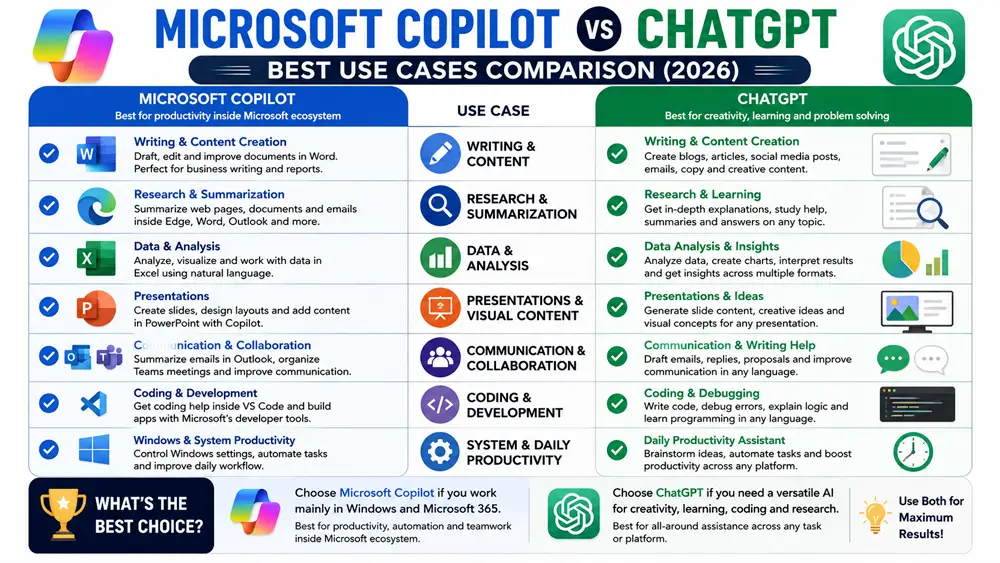
1. Writing & Content Creation
Writing quality is one of the most important factors when choosing an AI assistant.
ChatGPT consistently produces natural, engaging, and well-structured content for blog posts, marketing copy, emails, reports, product descriptions, and creative writing. It maintains a consistent tone across long-form content and is widely used by writers, marketers, educators, and businesses.
Microsoft Copilot also performs well for writing tasks, especially within Microsoft Word and Outlook. It helps users draft documents, rewrite paragraphs, summarize content, and improve grammar without leaving their Microsoft applications. This seamless integration can significantly improve productivity for Microsoft 365 users.
Winner: ChatGPT for overall writing quality and creativity, while Microsoft Copilot is the better choice for users who primarily write inside Microsoft Office applications.
2. Research & Knowledge Assistance
Both Microsoft Copilot and ChatGPT are excellent research assistants, but they offer different experiences.
ChatGPT excels at explaining complex topics, answering detailed questions, summarizing information, and helping users understand difficult concepts. It provides structured responses that are useful for students, educators, professionals, and content creators.
Microsoft Copilot combines conversational AI with Microsoft’s ecosystem to help users research information while working in applications like Microsoft Edge and Microsoft 365. It can summarize webpages, assist with reports, and help users organize information without interrupting their workflow.
Winner: ChatGPT for in-depth explanations and learning, while Microsoft Copilot is ideal for research within the Microsoft ecosystem.
3. Coding & Programming
Developers use AI assistants to write code, debug applications, explain algorithms, and improve software development productivity.
ChatGPT provides excellent coding assistance across many programming languages. It can generate code, identify bugs, explain complex logic, create documentation, and help developers learn new technologies.
Microsoft Copilot also delivers strong coding support, especially for developers using Microsoft’s development tools and cloud services. It integrates well with Microsoft’s ecosystem and helps programmers write cleaner code while improving productivity.
Winner: ChatGPT for overall coding flexibility, while Microsoft Copilot is an excellent option for developers working within Microsoft’s tools and services.
4. Productivity & Microsoft 365 Integration
This is where Microsoft Copilot truly stands out.
Copilot is deeply integrated into Microsoft Word, Excel, PowerPoint, Outlook, Teams, and Windows, allowing users to draft documents, summarize emails, create presentations, analyze spreadsheets, and automate repetitive office tasks directly within the applications they already use.
ChatGPT also improves productivity by helping users write content, summarize documents, brainstorm ideas, create reports, and automate workflows. However, these tasks are generally performed within the ChatGPT interface or through connected integrations rather than being built directly into Microsoft Office.
Winner: Microsoft Copilot for users who rely heavily on Microsoft 365, while ChatGPT remains the more versatile productivity assistant across different platforms.
5. Ease of Use
Both AI assistants offer modern, user-friendly interfaces that are easy to learn.
ChatGPT provides a clean conversational experience that allows users to switch naturally between writing, coding, research, brainstorming, and creative projects. Its flexibility makes it suitable for beginners as well as advanced users.
Microsoft Copilot feels especially familiar to people who already use Windows and Microsoft Office every day. Since AI features are integrated directly into familiar applications, users can improve their productivity without changing how they work.
Winner: Tie. ChatGPT offers greater flexibility across different tasks, while Microsoft Copilot provides a smoother experience for Microsoft 365 users.
Microsoft Copilot vs ChatGPT: Pricing
Both Microsoft Copilot and ChatGPT offer free plans, allowing users to explore their AI capabilities before upgrading to premium subscriptions.
ChatGPT provides a free version for everyday AI tasks, while ChatGPT Plus unlocks advanced AI models, faster responses, higher usage limits, and additional premium features for professionals and businesses.
Microsoft Copilot also offers free access to core AI features. Users who want deeper integration with Microsoft 365 applications such as Word, Excel, PowerPoint, Outlook, and Teams can upgrade to Copilot Pro for enhanced productivity and additional AI-powered features.
| Plan | ChatGPT | Microsoft Copilot |
|---|---|---|
| Free Plan | Yes | Yes |
| Premium Plan | ChatGPT Plus | Copilot Pro |
| Best For | General AI tasks | Microsoft 365 productivity |
If your daily work revolves around Microsoft Office applications, Copilot Pro provides excellent value. If you need a flexible AI assistant for writing, coding, research, and creativity across multiple platforms, ChatGPT Plus is the stronger choice.
ChatGPT Pros and Cons
Pros
- Excellent writing quality
- Outstanding coding assistance
- Strong reasoning and creativity
- Versatile across many industries
- Supports text, images, files, and voice (supported plans)
Cons
- Some advanced features require ChatGPT Plus.
- Native Microsoft Office integration is more limited than Copilot.
Microsoft Copilot Pros and Cons
Pros
- Deep integration with Microsoft 365
- Works directly inside Word, Excel, PowerPoint, Outlook, and Teams
- Excellent productivity features
- Familiar interface for Windows users
- Strong business collaboration capabilities
Cons
- Best experience requires Microsoft 365 and Copilot Pro.
- Less flexible than ChatGPT for creative writing and broad conversational tasks.
Microsoft Copilot vs ChatGPT for Students
Students use AI to understand complex topics, prepare assignments, organize notes, and improve their study habits.
ChatGPT is an excellent learning companion that explains difficult concepts, solves problems step by step, generates study materials, and assists with essays, presentations, and exam preparation.
Microsoft Copilot is especially useful for students who already use Microsoft Word, PowerPoint, Excel, OneNote, and other Microsoft 365 applications. Its built-in AI features help streamline coursework and improve productivity without leaving familiar software.
Recommendation: ChatGPT is the better all-around study assistant, while Microsoft Copilot is ideal for students deeply invested in Microsoft’s ecosystem.
Microsoft Copilot vs ChatGPT for Business
Businesses use AI to automate repetitive work, improve communication, create reports, analyze data, and increase overall productivity.
ChatGPT supports marketing, customer service, software development, research, and business writing across many industries. Its flexibility makes it valuable for teams with diverse workflows.
Microsoft Copilot is designed specifically for business productivity within Microsoft 365. It helps employees draft documents in Word, analyze spreadsheets in Excel, create presentations in PowerPoint, summarize Outlook emails, and collaborate more efficiently in Teams.
Recommendation: Microsoft Copilot is the better choice for organizations already using Microsoft 365, while ChatGPT remains the strongest all-purpose AI assistant for businesses.
Microsoft Copilot vs ChatGPT for Content Creators
Content creators need AI tools that can generate ideas, write engaging content, improve SEO, create video scripts, and streamline creative workflows.
ChatGPT is widely regarded as one of the best AI assistants for content creation. It produces natural, well-structured, and engaging writing for blog posts, YouTube scripts, newsletters, product descriptions, social media content, and marketing campaigns. Its ability to adapt to different writing styles makes it a favorite among bloggers, marketers, and copywriters.
Microsoft Copilot also supports content creation, particularly for users working in Microsoft Word and PowerPoint. It helps draft documents, refine presentations, summarize content, and improve writing quality directly within Microsoft 365 applications.
Recommendation: ChatGPT is the stronger choice for most content creators, while Microsoft Copilot is excellent for professionals creating business documents and presentations inside Microsoft Office.
Microsoft Copilot vs ChatGPT for Developers
Developers rely on AI assistants to write code, debug software, explain programming concepts, generate documentation, and improve development efficiency.
ChatGPT delivers outstanding coding assistance across multiple programming languages and frameworks. It can generate code, explain algorithms, review projects, identify bugs, and support developers throughout the software development process.
Microsoft Copilot also provides valuable coding support and integrates well with Microsoft’s development ecosystem. It is especially useful for developers working with Microsoft technologies, cloud services, and enterprise environments.
Recommendation: ChatGPT remains the better all-around coding assistant, while Microsoft Copilot is an excellent option for developers who primarily use Microsoft’s development tools and enterprise ecosystem.
Our Recommendation
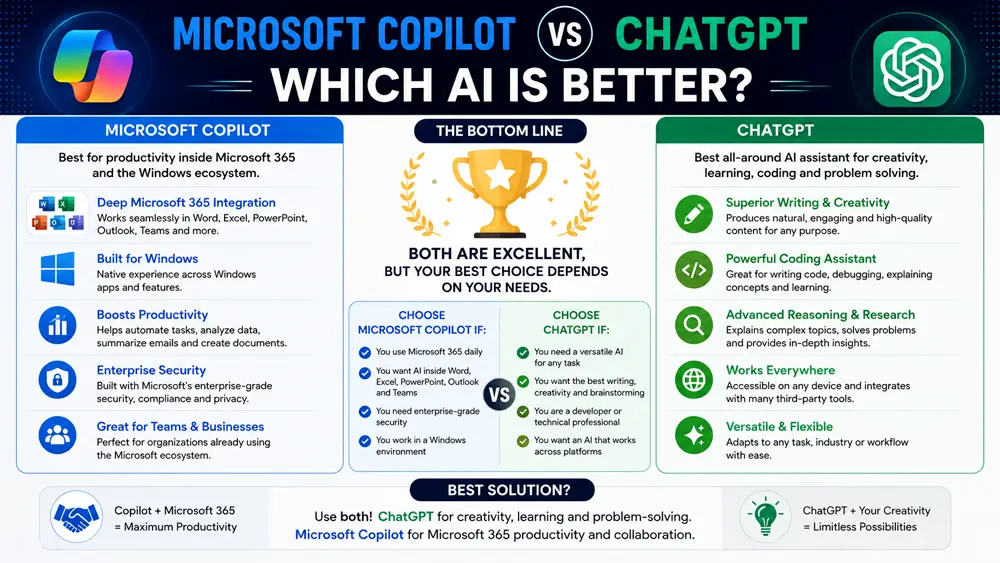
Choosing between Microsoft Copilot and ChatGPT depends on your daily workflow.
Choose ChatGPT if you need a versatile AI assistant for writing, coding, brainstorming, learning, marketing, research, and creative projects. It offers one of the most complete AI experiences available today.
Choose Microsoft Copilot if you spend most of your day using Windows, Microsoft Word, Excel, PowerPoint, Outlook, Teams, and other Microsoft 365 applications. Its seamless integration can significantly improve productivity without changing your existing workflow.
For many professionals, the best solution is to use both: ChatGPT for creativity, learning, and problem-solving, and Microsoft Copilot for Microsoft 365 productivity and workplace collaboration.
Final Verdict
Microsoft Copilot and ChatGPT are among the best AI assistants available in 2026, but they are designed for different priorities.
ChatGPT stands out for its exceptional writing quality, coding capabilities, reasoning, creativity, and flexibility. It is an excellent choice for students, developers, marketers, researchers, and professionals who need one AI assistant capable of handling a wide variety of tasks.
Microsoft Copilot shines through its deep integration with Windows and Microsoft 365. Users who work daily with Word, Excel, PowerPoint, Outlook, Teams, and other Microsoft services will benefit from AI features that fit naturally into their existing workflow.
Overall, ChatGPT is the better all-around AI assistant, while Microsoft Copilot is the stronger choice for users and organizations deeply invested in Microsoft’s ecosystem.
Interested in comparing more AI assistants? Explore our ChatGPT vs Claude, ChatGPT vs Gemini, Claude vs Gemini, Perplexity AI vs ChatGPT, and Kimi vs ChatGPT guides.
FAQs
Is Microsoft Copilot better than ChatGPT?
Microsoft Copilot is better for users who work extensively with Microsoft 365 applications like Word, Excel, PowerPoint, Outlook, and Teams. ChatGPT is the stronger all-around AI assistant for writing, coding, creativity, research, and everyday productivity.
Is Microsoft Copilot free?
Yes. Microsoft Copilot offers a free version with core AI features. Users who need advanced Microsoft 365 integration and additional capabilities can upgrade to Copilot Pro.
Which AI is better for students?
ChatGPT is the better choice for most students because it provides detailed explanations, writing assistance, and study support across many subjects. Microsoft Copilot is particularly useful for students who frequently use Microsoft Office for assignments and presentations.
Which AI is better for coding?
Both AI assistants can help developers write and debug code, but ChatGPT generally offers a more comprehensive coding experience across programming languages and development tasks.
Can I use Microsoft Copilot and ChatGPT together?
Yes. Many professionals use ChatGPT for brainstorming, writing, coding, and research while using Microsoft Copilot to improve productivity inside Windows and Microsoft 365 applications.