ChatGPT vs Google NotebookLM: Which AI Is Better for Students?
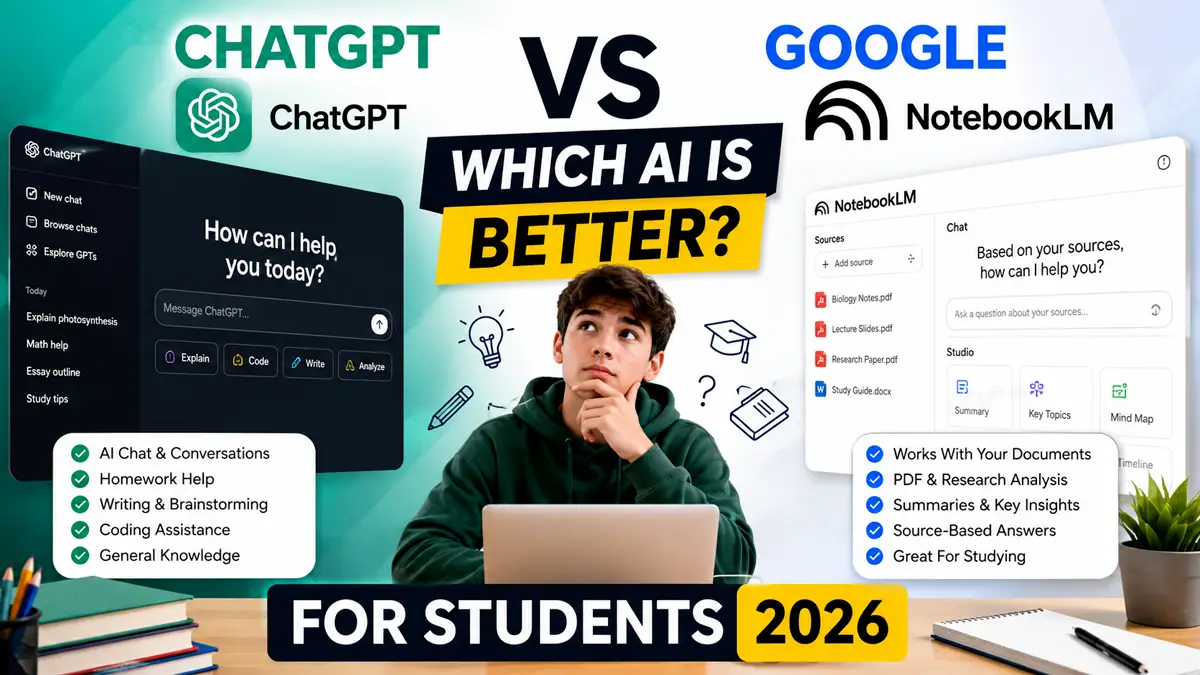
ChatGPT vs Google NotebookLM is one of the biggest questions students ask when choosing an AI study assistant. While both tools use artificial intelligence to improve learning, they are designed for different purposes.
ChatGPT excels at explaining concepts, brainstorming ideas, solving problems, and answering questions conversationally. Google NotebookLM, on the other hand, focuses on understanding your own documents, summarizing notes, analyzing PDFs, and helping you study from trusted sources.
In this detailed comparison, we’ll compare ChatGPT vs Google NotebookLM across studying, homework, note-taking, research, productivity, pricing, and accuracy to help you decide which AI tool is right for your needs.
ChatGPT vs Google NotebookLM: Quick Comparison
| Feature | ChatGPT | Google NotebookLM |
|---|---|---|
| Best For | Homework, brainstorming, writing | Research, PDFs, lecture notes |
| AI Model | OpenAI GPT | Google Gemini |
| Uses Your Documents | Limited | Excellent |
| PDF Analysis | Very Good | Excellent |
| Research | ★★★★☆ | ★★★★★ |
| Creative Writing | ★★★★★ | ★★★☆☆ |
| Homework Help | ★★★★★ | ★★★★☆ |
| Note Taking | ★★★★☆ | ★★★★★ |
| Free Version | Yes | Yes |
| Overall Winner | General AI Assistant | Research & Studying |
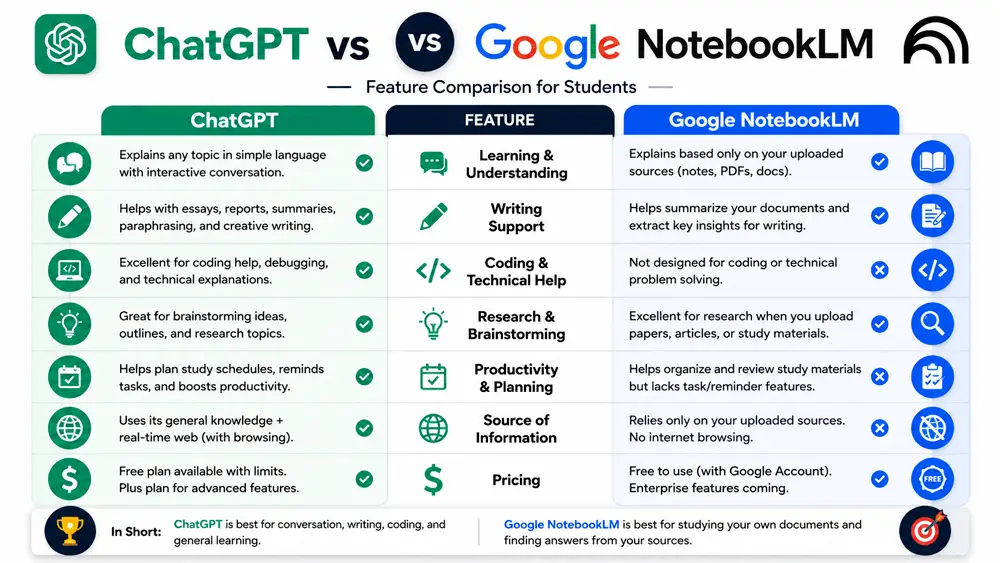
Table of Contents
What Is ChatGPT?
ChatGPT is an AI chatbot developed by OpenAI that helps users answer questions, explain complex topics, generate ideas, write content, solve problems, and assist with studying. Its conversational interface makes learning interactive, allowing students to ask follow-up questions until they fully understand a topic.
For students, ChatGPT is particularly useful for homework assistance, essay planning, brainstorming, coding support, language learning, exam preparation, and simplifying difficult concepts.
Unlike traditional search engines, ChatGPT provides direct explanations instead of requiring users to read multiple web pages.
Best Features of ChatGPT
- Natural conversational AI
- Homework assistance
- Essay and writing support
- Programming help
- Language translation
- Creative brainstorming
- Personalized explanations
- Image generation (depending on plan)
To learn more about ChatGPT’s features and plans, visit the official ChatGPT page from OpenAI.
What Is Google NotebookLM?
Google NotebookLM is an AI-powered research and note-taking assistant built on Google’s Gemini models. Instead of answering general questions from its training knowledge alone, NotebookLM works directly with the documents you upload.
Students can upload PDFs, lecture slides, research papers, textbooks, Google Docs, or class notes and ask questions based only on those sources. This makes NotebookLM especially useful for studying from trusted materials.
NotebookLM can summarize documents, generate study guides, answer questions with citations, and organize information into easy-to-understand notes.
Best Features of Google NotebookLM
- PDF summarization
- Document-based AI answers
- Source citations
- Lecture note organization
- Research assistant
- Study guide generation
- Google Workspace integration
- Audio Overviews (where available)
You can explore the latest NotebookLM features on the official Google NotebookLM website.
ChatGPT vs Google NotebookLM: Feature-by-Feature Comparison
| Category | Winner | Reason |
|---|---|---|
| Homework Help | 🏆 ChatGPT | Provides step-by-step explanations across many subjects. |
| Research Papers | 🏆 NotebookLM | Uses uploaded documents and provides source-based answers. |
| Lecture Notes | 🏆 NotebookLM | Excellent for organizing and summarizing class materials. |
| Brainstorming | 🏆 ChatGPT | Generates creative ideas and outlines quickly. |
| Essay Writing | 🏆 ChatGPT | Offers writing assistance, editing, and drafting support. |
| PDF Analysis | 🏆 NotebookLM | Built specifically for document understanding. |
| Exam Preparation | Tie | Both tools help, but in different ways. |
| Accuracy with Your Notes | 🏆 NotebookLM | Answers are grounded in your uploaded sources. |
| General Knowledge | 🏆 ChatGPT | Handles a broad range of topics and conversations. |
| Overall Flexibility | 🏆 ChatGPT | Supports many everyday tasks beyond studying. |
Pricing Comparison
Both ChatGPT and Google NotebookLM offer free versions, making them accessible to most students. However, their premium plans provide additional capabilities that may be valuable for advanced users.
| Feature | ChatGPT | Google NotebookLM |
|---|---|---|
| Free Plan | Yes | Yes |
| Premium Plan | ChatGPT Plus | Included with eligible Google Workspace plans and evolving premium offerings depending on region |
| Best Value | Excellent for general AI tasks | Excellent for document-based studying |
For most students, the free versions are sufficient. Consider upgrading only if the additional features match your workflow.
Real-World Student Scenarios
Scenario 1: Writing an Essay
If you’re starting with a blank page, ChatGPT is often the better choice. It can help you brainstorm ideas, create an outline, explain concepts, and improve your writing style. Remember to write in your own words and follow your school’s academic integrity policies.
Scenario 2: Studying Lecture Notes
If your professor provides lecture slides or PDFs, Google NotebookLM is especially useful. Upload your materials and ask questions based on those documents to create summaries and study guides.
Scenario 3: Preparing for Exams
A practical workflow is to use NotebookLM to summarize your course materials, then use ChatGPT to quiz yourself, explain difficult concepts, and practice answering questions.
Scenario 4: Group Projects
ChatGPT can help generate ideas and organize presentations, while NotebookLM can keep everyone aligned by referencing the same shared research materials.
Privacy and Data Considerations
Students should avoid uploading confidential, personal, or copyrighted materials unless they understand how the platform handles data. Always review the latest privacy policies before using AI tools for academic work.
If you’re working with sensitive class documents or research, check your school’s guidance and use AI responsibly.
Can You Use ChatGPT and NotebookLM Together?
Yes. In fact, many students get the best results by combining both tools.
- Upload lecture notes and PDFs to NotebookLM.
- Create summaries and identify key concepts.
- Copy those concepts into ChatGPT.
- Ask ChatGPT to explain difficult topics in simpler language.
- Generate practice questions and quiz yourself.
- Create a final revision checklist before exams.
This workflow combines NotebookLM’s document understanding with ChatGPT’s conversational learning experience.
Our Recommendation
If you can only choose one AI tool, your decision should depend on your primary goal.
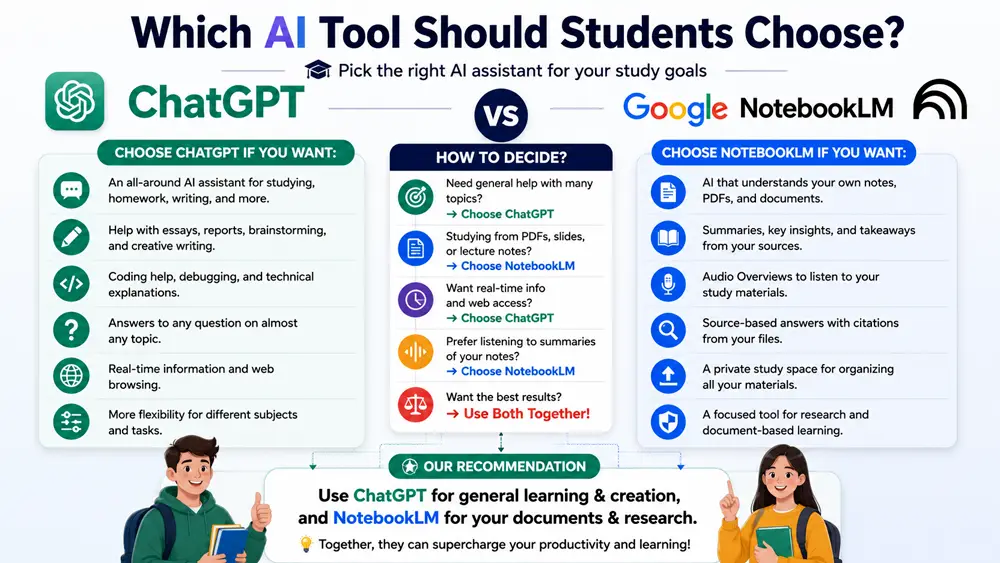
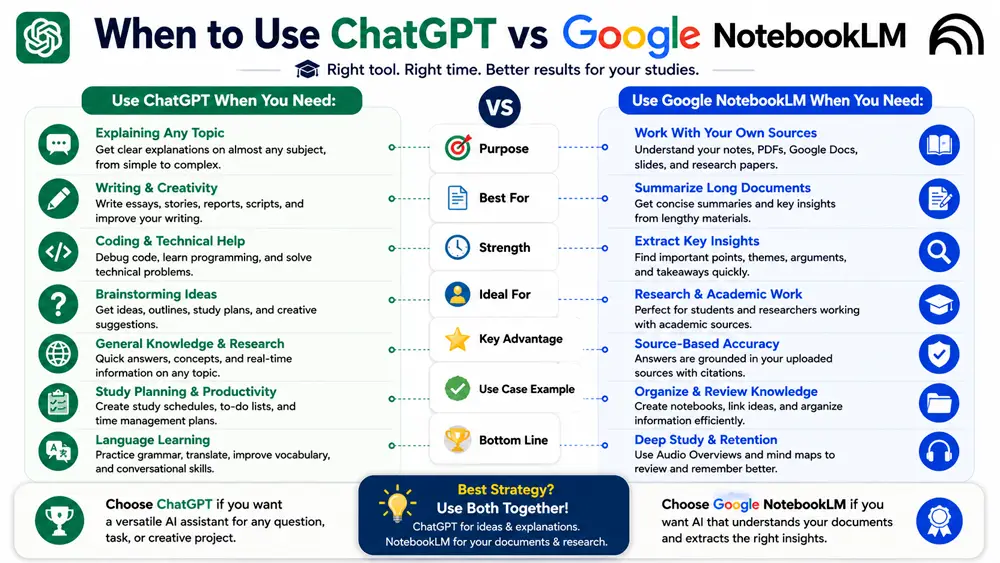
- Choose ChatGPT if you need a flexible AI assistant for homework, writing, brainstorming, coding, and everyday learning.
- Choose Google NotebookLM if you spend most of your time reading PDFs, reviewing lecture notes, researching academic topics, and studying from your own documents.
- Use both together if you want the most complete AI-powered study workflow.
When Should Students Choose ChatGPT?
Choose ChatGPT if you need an AI assistant that can explain concepts, answer homework questions, improve writing, brainstorm ideas, practice interviews, learn programming, or help with everyday productivity. It works best when you need conversational guidance across many different topics.
ChatGPT is ideal for:
- Essay writing
- Homework explanations
- Coding practice
- Language learning
- Brainstorming projects
- Creative assignments
When Should Students Choose Google NotebookLM?
Choose Google NotebookLM if you study from textbooks, lecture slides, PDFs, research papers, or Google Docs. Because it answers questions using your own uploaded materials, it’s an excellent choice for revision and exam preparation.
NotebookLM is ideal for:
- Research papers
- Class notes
- Lecture slides
- PDF textbooks
- Exam revision
- Study guides
Pros and Cons
ChatGPT Pros
- Excellent for explaining difficult concepts
- Strong writing and brainstorming capabilities
- Useful across many subjects and tasks
- Great for coding and problem-solving
- Natural conversational experience
ChatGPT Cons
- May generate incorrect information without verification
- Not designed specifically for document-based research
- Some advanced features require a paid subscription
Google NotebookLM Pros
- Works directly with your own documents
- Excellent for PDF analysis and lecture notes
- Provides answers based on uploaded sources
- Ideal for research and exam preparation
- Well integrated with Google Workspace
Google NotebookLM Cons
- Less suitable for creative writing
- Requires source documents for the best experience
- Fewer general-purpose AI features than ChatGPT
ChatGPT vs Google NotebookLM for Different Types of Students
Every student studies differently, so the best AI tool depends on your learning style, subjects, and daily workflow. Here’s a quick recommendation based on different student needs.
| Student Type | Recommended Tool | Reason |
|---|---|---|
| High School Students | ChatGPT | Easy explanations, homework help, and interactive learning. |
| College Students | Both | Use ChatGPT for learning concepts and NotebookLM for research materials. |
| Medical Students | NotebookLM | Excellent for reviewing textbooks, lecture slides, and research papers. |
| Engineering Students | ChatGPT | Strong support for programming, mathematics, and technical explanations. |
| Research Students | NotebookLM | Built for analyzing documents and answering questions from uploaded sources. |
Common Mistakes Students Make When Using AI
- Copying AI-generated answers without understanding them.
- Relying on AI without checking facts or course materials.
- Uploading sensitive or personal information.
- Ignoring citations and academic integrity rules.
- Using only one AI tool when another may be better suited for the task.
The best results come from treating AI as a learning assistant rather than a replacement for studying.
Tips for Getting Better Results
- Ask specific questions instead of broad ones.
- Break complex topics into smaller questions.
- Upload organized notes when using NotebookLM.
- Ask ChatGPT to explain answers in simpler language.
- Verify important facts using trusted academic sources.
- Review AI-generated content before submitting assignments.
Should You Switch Between Both Tools?
Yes. Many students don’t need to choose one tool permanently. Instead, use the right tool at the right stage of your study process.
- Collect lecture notes and PDFs.
- Summarize them with NotebookLM.
- Ask ChatGPT to explain difficult concepts.
- Create flashcards and practice questions.
- Review weak areas before exams.
This workflow combines the strengths of both platforms while reducing their individual limitations.
Key Takeaways
- Choose ChatGPT for conversations, writing, brainstorming, coding, and homework help.
- Choose Google NotebookLM for document analysis, lecture notes, research, and exam preparation.
- Using both tools together often provides the most effective study experience.
- Always verify important information and follow your school’s academic integrity policies.
Final Verdict: ChatGPT vs Google NotebookLM
When comparing ChatGPT vs Google NotebookLM, there isn’t a single winner for every situation. The best choice depends on how you study and the type of tasks you perform.
If you need an AI assistant for homework, brainstorming, essay writing, coding, and everyday learning, ChatGPT is the better choice. It offers flexibility, conversational learning, and support across a wide range of subjects.
If your priority is studying from lecture notes, textbooks, PDFs, research papers, or class materials, Google NotebookLM is the stronger option. Its ability to understand your own documents makes it one of the best AI tools for serious academic research.
Many students may benefit from using both tools together—ChatGPT for understanding concepts and generating ideas, and NotebookLM for reviewing trusted study materials and organizing notes.
ChatGPT vs Google NotebookLM: Side-by-Side Performance
Although both tools use advanced artificial intelligence, they excel in different situations. The table below highlights which platform performs better across common student tasks.
| Task | Best Tool | Why |
|---|---|---|
| Understanding difficult concepts | ChatGPT | Interactive conversations with follow-up questions. |
| Studying lecture slides | NotebookLM | Uses uploaded class materials as its knowledge base. |
| Research papers | NotebookLM | Provides answers grounded in your uploaded sources. |
| Essay planning | ChatGPT | Excellent for brainstorming and outlining ideas. |
| Programming assignments | ChatGPT | Provides coding explanations and debugging assistance. |
| Revision before exams | Both | NotebookLM summarizes notes, while ChatGPT explains weak areas. |
Best Practices for Using AI Responsibly
Artificial intelligence should support learning—not replace it. Students can get the most value by using AI as a study assistant while continuing to think critically and verify important information.
- Read the original textbook or lecture notes before asking AI for explanations.
- Use AI to simplify difficult concepts rather than copying answers.
- Double-check important facts with trusted academic sources.
- Follow your school’s academic integrity and plagiarism policies.
- Avoid uploading confidential or sensitive information.
Which AI Tool Should You Choose?
If you want one AI assistant for everyday learning, homework, writing, brainstorming, coding, and productivity, ChatGPT is the stronger all-around choice.
If your workflow revolves around lecture notes, research papers, textbooks, PDFs, and document-based studying, Google NotebookLM offers features specifically designed for that purpose.
For many students, the smartest approach is to combine both tools. Use NotebookLM to organize and understand your study materials, then switch to ChatGPT for deeper explanations, revision, and practice questions.
Editor’s Recommendation
After comparing features, usability, flexibility, and study workflows, we recommend ChatGPT as the best all-around AI assistant for most students. However, if your priority is learning directly from your own documents and research materials, Google NotebookLM is difficult to beat.
Rather than asking which tool is universally better, ask which one best fits your learning style. In many cases, using both together provides the most effective and productive study experience.
Related AI Comparisons
If you’re exploring different AI assistants, these comparisons may also help:
Frequently Asked Questions (FAQs)
Is ChatGPT better than Google NotebookLM?
ChatGPT is better for general conversations, homework help, writing, and brainstorming. Google NotebookLM is better for studying from your own documents, lecture notes, and research materials.
Can students use ChatGPT and Google NotebookLM together?
Yes. Many students use ChatGPT to understand concepts and NotebookLM to organize notes, summarize PDFs, and prepare for exams using trusted sources.
Which AI tool is better for homework?
ChatGPT is generally better for homework because it can explain concepts step by step, answer follow-up questions, and provide guidance across many subjects.
Which AI tool is best for research?
Google NotebookLM is usually the better option for research because it answers questions using your uploaded documents instead of relying only on general knowledge.
Are ChatGPT and Google NotebookLM free?
Both offer free versions. Premium plans provide additional features, higher limits, and more advanced AI capabilities.
Related Guides
- Best AI Note-Taking Apps
- How to Use ChatGPT for Studying
- 100+ Best ChatGPT Prompts for Students
- How to Use AI for Homework
- Best AI Productivity Tools
Explore More AI Tools
Looking for more AI tools, tutorials, and expert comparisons? Visit Netfinity AI to discover in-depth guides that help students, creators, professionals, and businesses choose the right AI solutions. Explore AI Tools →