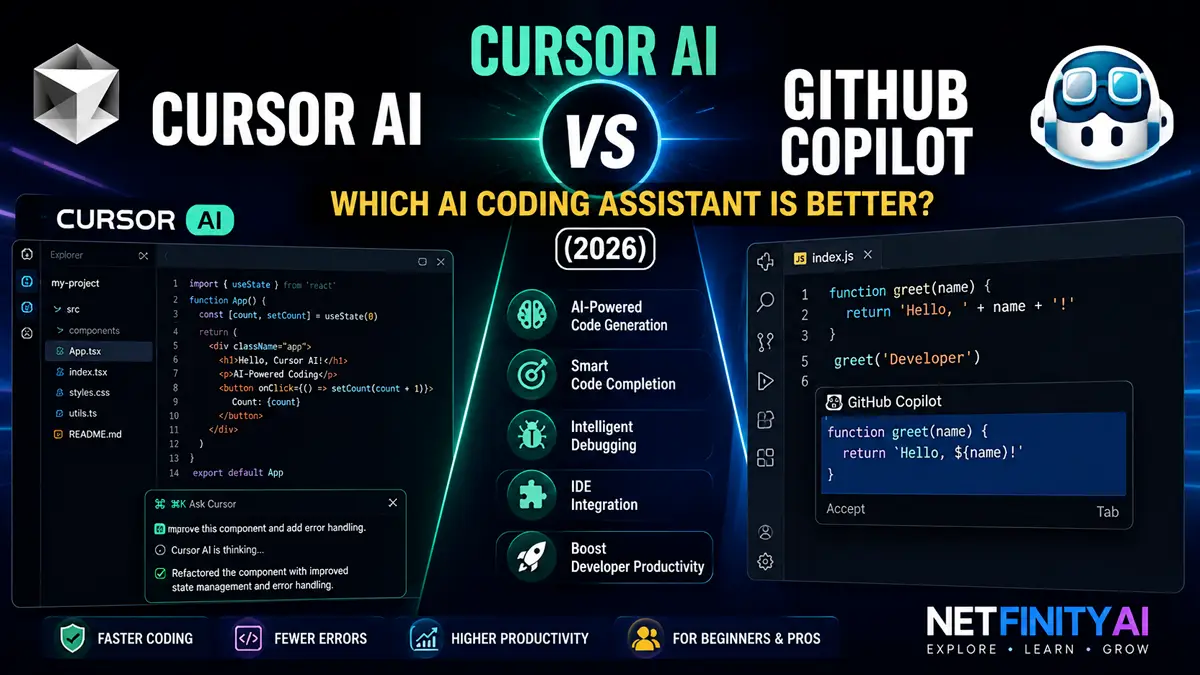
Cursor AI vs GitHub Copilot: Which AI Coding Assistant Is Better?
AI coding assistants have become an essential part of modern software development, helping developers write code faster, debug applications, and automate repetitive programming tasks. Among the most popular options in 2026 are Cursor AI and GitHub Copilot, two powerful tools designed to improve coding productivity.
Although both use artificial intelligence to assist developers, they take different approaches. Cursor AI is an AI-first code editor built around intelligent coding workflows and project-wide context, while GitHub Copilot focuses on real-time code completion directly inside popular IDEs like Visual Studio Code and JetBrains.
In this comparison, we’ll evaluate Cursor AI vs GitHub Copilot based on coding accuracy, debugging capabilities, IDE integration, supported programming languages, pricing, ease of use, and overall developer experience. By the end, you’ll know which AI coding assistant is the better choice for your workflow.
If you’re exploring AI coding tools, you may also find our 15 Best AI Coding Tools in 2026, Claude Code vs GitHub Copilot, and Microsoft Copilot vs ChatGPT guides helpful.
This comparison is based on real-world developer workflows, ease of use, AI-assisted coding capabilities, and overall value rather than marketing claims.
At a Glance
| Quick Answer | Winner |
|---|---|
| Best Overall | Cursor AI |
| Best for Beginners | GitHub Copilot |
| Best Code Completion | GitHub Copilot |
| Best Debugging | Cursor AI |
| Best Project Context | Cursor AI |
| Best Enterprise | GitHub Copilot |
Quick Comparison
| Feature | Cursor AI | GitHub Copilot |
|---|
| Best For | AI-first coding | Code completion |
| IDE | Built on VS Code | VS Code, JetBrains & more |
| Project Context | ⭐⭐⭐⭐⭐ | ⭐⭐⭐⭐☆ |
| Code Completion | ⭐⭐⭐⭐☆ | ⭐⭐⭐⭐⭐ |
| Debugging | ⭐⭐⭐⭐⭐ | ⭐⭐⭐⭐☆ |
| Learning Curve | Moderate | Easy |
| Free Plan | Yes | Trial |
| Overall Rating | ⭐⭐⭐⭐⭐ | ⭐⭐⭐⭐⭐ |
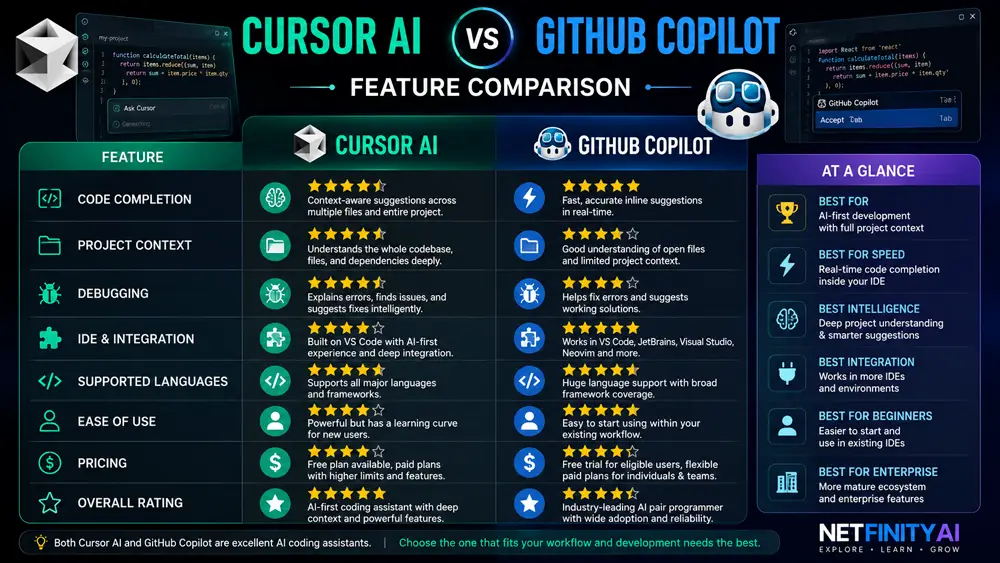
What Is Cursor AI?
Cursor AI is an AI-powered code editor built on Visual Studio Code that places artificial intelligence at the center of the development experience. Instead of acting as a simple autocomplete tool, Cursor understands project context, explains code, generates new features, fixes bugs, and assists with large-scale refactoring.
One of Cursor’s biggest advantages is its ability to analyze an entire codebase rather than only the current file. Developers can ask questions about their project, request architectural improvements, and receive context-aware coding suggestions.
Because of these capabilities, Cursor has become increasingly popular among professional developers working on medium to large software projects.
Best for: Developers who want an AI-first coding environment with deep project awareness.
Visit the official Cursor website for the latest features and pricing.
What Is GitHub Copilot?
GitHub Copilot is an AI coding assistant developed by GitHub in collaboration with OpenAI. It integrates directly into popular IDEs and provides intelligent code completions, function generation, documentation assistance, and programming suggestions while developers write code.
Unlike Cursor, GitHub Copilot is designed to enhance existing development environments instead of replacing them. This makes it easy for developers to continue using their preferred IDE while benefiting from AI-assisted coding.
GitHub Copilot supports a wide range of programming languages and has become one of the most widely adopted AI coding assistants in the software industry.
Best for: Developers who want fast, reliable AI code completion within their existing IDE.
Learn more on the official GitHub Copilot website.
Feature-by-Feature Comparison
Coding Accuracy
Both Cursor AI and GitHub Copilot generate high-quality code, but they excel in different areas.
Cursor AI performs exceptionally well when working with larger projects because it understands relationships across multiple files. This context allows it to generate more relevant suggestions for complex software systems.
GitHub Copilot shines in day-to-day development by producing fast and accurate inline code completions. It is particularly effective for repetitive coding tasks, boilerplate generation, and implementing common programming patterns.
Winner: Cursor AI for project-aware coding, GitHub Copilot for rapid code completion.
Debugging
Debugging is one of Cursor AI’s strongest features. Developers can ask the AI to explain errors, identify bugs, and suggest fixes using information from across the project.
GitHub Copilot also helps with debugging by recommending fixes and generating corrected code, but its understanding is generally more focused on the immediate coding context.
For developers maintaining complex applications, Cursor AI often provides more comprehensive debugging assistance.
Winner: Cursor AI.
IDE Integration
Both Cursor AI and GitHub Copilot integrate smoothly into modern development workflows, but they do so in different ways.
Cursor AI is a standalone AI-powered code editor built on Visual Studio Code. Because the editor itself is designed around artificial intelligence, features such as project-wide chat, intelligent refactoring, and context-aware code generation feel deeply integrated into the development experience.
GitHub Copilot, on the other hand, works inside existing IDEs including Visual Studio Code, JetBrains IDEs, Visual Studio, and Neovim. Developers who already have an established workflow can start using Copilot without changing editors.
Winner: GitHub Copilot for flexibility, Cursor AI for a fully integrated AI experience.
If you’re comparing general AI assistants beyond coding, see our Microsoft Copilot vs ChatGPT guide.
Supported Programming Languages
Both AI coding assistants support a wide range of programming languages including Python, JavaScript, TypeScript, Java, C#, Go, Rust, PHP, Ruby, and C++.
GitHub Copilot has broad language coverage and performs particularly well for widely used programming languages and frameworks.
Cursor AI supports the same popular languages while using project context to generate more relevant suggestions across larger applications.
For most developers, language support is unlikely to be the deciding factor because both tools cover the languages used in modern software development.
Winner: Tie.
Pricing
| Plan | Cursor AI | GitHub Copilot |
|---|---|---|
| Free | ✅ | Trial |
| Paid | ✅ | ✅ |
| Team | ✅ | ✅ |
| Enterprise | Limited | ✅ |
Pros and Cons
Cursor AI
Pros
- Excellent project awareness
- Powerful debugging
- AI-first editor
- Strong refactoring tools
Cons
- Learning curve for new users
- Requires switching editors
GitHub Copilot
Pros
- Outstanding code completion
- Excellent IDE support
- Easy to start using
- Mature ecosystem
Cons
- Less project-wide understanding
- Some advanced features require paid plans
Cursor AI vs GitHub Copilot for Beginners
For beginners, ease of use and learning support are often more important than advanced AI features.
GitHub Copilot is generally easier to start with because it integrates directly into popular IDEs and provides real-time code suggestions without requiring developers to change their workflow. New programmers can continue using familiar tools while benefiting from AI-assisted code completion.
Cursor AI has a slightly steeper learning curve because it introduces an AI-first development environment. However, once beginners become comfortable with its interface, they can take advantage of powerful project-wide explanations, debugging assistance, and intelligent refactoring features.
Winner for beginners: GitHub Copilot.
Cursor AI vs GitHub Copilot for Professional Developers
Professional software developers often work on large codebases where understanding project context is critical.
Cursor AI excels in these situations because it analyzes multiple files, understands relationships between components, and provides more context-aware recommendations. Developers can ask questions about their entire project, refactor large sections of code, and debug complex issues more efficiently.
GitHub Copilot remains an outstanding productivity tool for experienced developers, particularly when writing new code or completing repetitive tasks. Its mature ecosystem and broad IDE support make it an excellent choice for teams that want AI assistance without changing their existing workflow.
Winner for professional developers: Cursor AI.
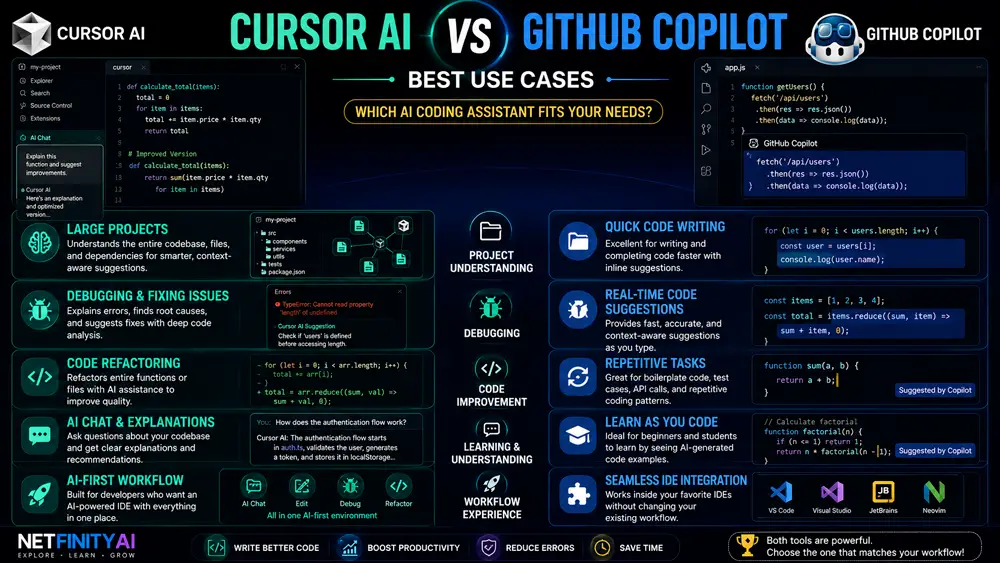
Feature Comparison Table
| Feature | Cursor AI | GitHub Copilot | Winner |
|---|---|---|---|
| Code Completion | ⭐⭐⭐⭐☆ | ⭐⭐⭐⭐⭐ | GitHub Copilot |
| Debugging | ⭐⭐⭐⭐⭐ | ⭐⭐⭐⭐☆ | Cursor AI |
| Project Context | ⭐⭐⭐⭐⭐ | ⭐⭐⭐⭐☆ | Cursor AI |
| IDE Support | ⭐⭐⭐⭐☆ | ⭐⭐⭐⭐⭐ | GitHub Copilot |
| Ease of Use | ⭐⭐⭐⭐☆ | ⭐⭐⭐⭐⭐ | GitHub Copilot |
| Learning | ⭐⭐⭐⭐⭐ | ⭐⭐⭐⭐☆ | Cursor AI |
| Enterprise | ⭐⭐⭐⭐☆ | ⭐⭐⭐⭐⭐ | GitHub Copilot |
| Overall | ⭐⭐⭐⭐⭐ | ⭐⭐⭐⭐⭐ | Tie |
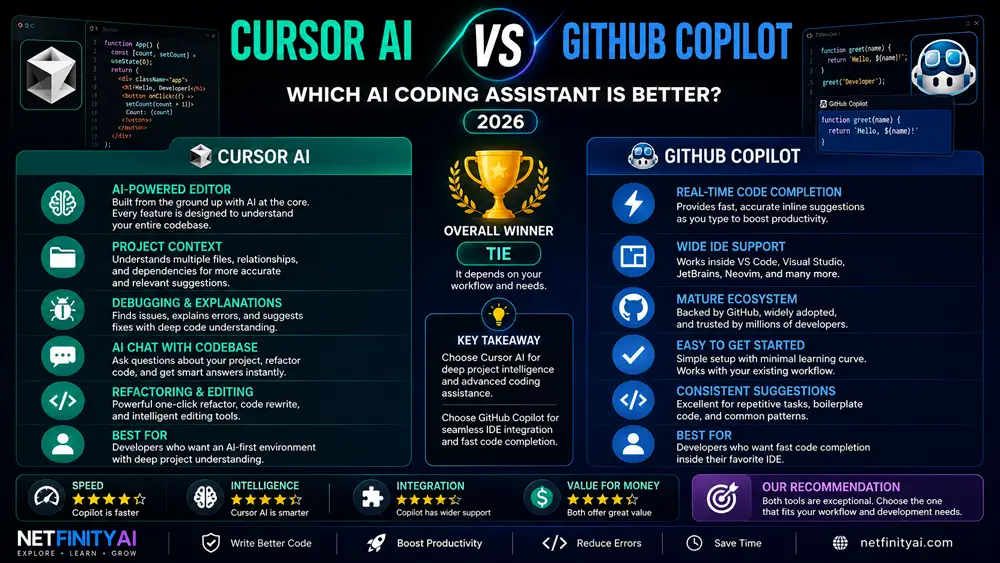
Our Recommendation
Both Cursor AI and GitHub Copilot are among the best AI coding assistants available today, but they serve slightly different audiences.
Choose Cursor AI if you want an AI-first coding environment with powerful debugging, project-wide understanding, and intelligent code editing features.
Choose GitHub Copilot if you prefer staying inside your existing IDE while benefiting from fast, accurate code completion and a mature development ecosystem.
If you’re building large applications or frequently refactor complex projects, Cursor AI has a slight advantage. If your primary goal is writing code faster with minimal workflow changes, GitHub Copilot remains one of the best choices.
Frequently Asked Questions
Is Cursor AI better than GitHub Copilot?
Cursor AI is better for developers who want project-wide context, advanced debugging, and an AI-first coding experience. GitHub Copilot is better for developers who prefer fast code completion inside their existing IDE.
Which AI coding assistant is best for beginners?
GitHub Copilot is generally easier for beginners because it integrates with familiar IDEs and provides real-time code suggestions without requiring developers to learn a new editor.
Is Cursor AI free?
Yes. Cursor AI offers a free plan with basic AI features, while paid plans provide higher usage limits and access to additional capabilities.
Is GitHub Copilot free?
GitHub Copilot offers free access for some eligible users and provides paid plans for individuals, businesses, and enterprise teams with additional features.
Which AI coding assistant is best for Python?
Both Cursor AI and GitHub Copilot perform very well with Python. Cursor AI is stronger for understanding larger Python projects, while GitHub Copilot excels at generating functions and completing repetitive code.
Can AI replace software developers?
No. AI coding assistants improve productivity by helping developers write, review, and debug code more efficiently, but they do not replace human creativity, architectural decisions, or problem-solving skills.
Interested in general-purpose AI assistants? Read our Claude vs Gemini comparison.
Final Verdict
After comparing Cursor AI and GitHub Copilot across coding accuracy, debugging, IDE integration, pricing, and overall developer experience, it’s clear that both tools are excellent choices.
Choose Cursor AI if you want an AI-first editor with powerful project awareness, intelligent debugging, and advanced code understanding.
Choose GitHub Copilot if you prefer staying inside your existing IDE while benefiting from industry-leading code completion and a mature development ecosystem.
For most professional developers working on larger projects, Cursor AI offers the stronger overall experience. However, GitHub Copilot remains one of the best AI coding assistants for developers who prioritize speed, simplicity, and broad IDE compatibility.
You may also enjoy our ChatGPT vs Claude comparison if you’re choosing between leading AI assistants.
Ultimately, the best choice depends on your workflow, development environment, and personal preferences.